Presentation Skills: How to Give Better Presentations
You can know your topic inside out and still lose your audience in the first few minutes. The problem is not always the information. Sometimes, it is how you deliver it. Strong presentation skills help you organize your ideas, explain them clearly, and keep your audience with you.

Key Takeaways
- A good presentation starts with a clear purpose and a specific audience.
- Your voice, words, and body language should work together.
- Practice your main ideas instead of memorizing every sentence.
- Slides should support your message, not compete with it.
- Audience interaction can make a presentation more engaging.
- Preparing for stage fright is more useful than simply hoping the nerves disappear.
- Regular practice and honest feedback are two of the best ways to improve.
Table of Contents
- What Are Presentation Skills?
- Why Are Presentation Skills Important?
- What Are the Most Important Presentation Skills?
- How to Improve Your Presentation Skills
- Tips for Managing Stage Fright Before a Presentation
- Common Presentation Mistakes to Avoid
- Presentation Skills Checklist
- Frequently Asked Questions
- Conclusion
What Are Presentation Skills?
Presentation skills are the tools you use to turn an idea into a clear message. They cover much more than speaking. How you organize your ideas, use your voice, move, make eye contact, and use visuals can all change how your message is received. Strong presentation skills help you explain an idea clearly and give your audience a reason to stay focused on what you are saying. Coursera: What Are Effective Presentation Skills?
Why Are Presentation Skills Important?

You can know your subject well and still lose the room if your message is difficult to follow. Presentation skills help you turn your knowledge into something people can understand, remember, and act on.
Students use these skills when giving class presentations, explaining group projects, answering questions, or presenting research. In professional settings, the same skills can help with meetings, project updates, training sessions, interviews, and client presentations.
Think of presentation skills as something you build, not something you either naturally have or do not have. You do not need to be the most outgoing person in the room. You need to understand your message, prepare properly, and learn how to deliver it with confidence.
What Are the Most Important Presentation Skills?
Great presenters rarely rely on one skill. Clear communication, confident delivery, body language, audience awareness, and good preparation all work together.
Verbal Communication
Your words need to be clear enough for the audience to follow without unnecessary effort. Use language that fits their level of knowledge and explain unfamiliar terms when needed.
Try reading your presentation aloud during practice. A sentence that looks fine on a screen can sound awkward when spoken.
Body Language

Your posture, facial expressions, gestures, eye contact, and movement all affect how your message comes across.
For example, if you spend the entire presentation looking at your laptop or slides, the audience may feel disconnected. Looking up regularly and using natural gestures can make your delivery feel much more direct. Toastmasters: Public Speaking Tips
Voice and Delivery
A clear voice is only the starting point. Your pace, tone, volume, and pauses also matter.
If you speak at exactly the same speed from beginning to end, important points can get lost. Slow down when an idea needs more attention. A short pause can sometimes do more than another sentence.
Audience Awareness
A presentation should be designed for the people who are actually listening.
Before you prepare your content, think about:
- What does the audience already know?
- What do they need to learn?
- What questions might they have?
- What examples will make the topic easier to understand?
- What should they remember after the presentation?
The answers can change the entire way you organize your presentation.
Storytelling
A good story does not have to be dramatic. Sometimes a simple example is enough to make an idea easier to understand.
Instead of giving your audience a list of facts, show them how those facts relate to a real situation. A real situation gives those facts context, so the audience can see why they matter.
Active Listening
Presenting is not only about talking. You also need to listen carefully when someone asks a question or gives feedback.
Let the person finish the question before answering. If you are unsure what they mean, ask them to clarify. A thoughtful answer is better than a rushed one.
Confidence

Confidence does not mean you never feel nervous. Many capable presenters still feel nervous before speaking.
What matters is being prepared enough to continue when those nerves appear. In my view, preparation is one of the most practical ways to build confidence because you know what you want to say and what you want the audience to take away.
How to Improve Your Presentation Skills
Do not try to fix everything at once. Start with one part of your presentation, improve it, and then move to the next.
1. Decide What You Want the Audience to Remember
Start with one main message.
For example, if your topic is time management, simply saying “time management is important” gives you very little direction. A clearer message might be that prioritizing a small number of important tasks can make daily planning more manageable.
Once you know your main point, decide which information actually supports it. Anything unrelated can probably be removed.
2. Learn About Your Audience
The same presentation can work very differently for two audiences.
A group of beginners may need definitions and simple examples. A group of experienced professionals may want practical details, evidence, or solutions to specific problems.
Before writing your presentation, consider the audience’s knowledge, expectations, and likely questions. This small step can prevent you from making the presentation either too basic or unnecessarily complicated.
3. Organize Your Ideas Before Designing Slides

Resist the urge to design your slides first. It is tempting to open PowerPoint and start choosing layouts, fonts, and images, but your message should come before the design.
First, decide what you want to say.
A straightforward structure usually works well:
Opening: Introduce the topic and explain why it matters.
Main section: Develop your key points in a logical order.
Closing: Remind the audience of the main message and give them a clear takeaway.
When the structure is strong, designing the slides becomes much easier.
| Pro Tip: If you cannot explain your main point without the slides, your presentation may be carrying too much information. Build the message first, then use the slides to support it. |
4. Create Visuals That Actually Help
A slide should make your explanation easier to understand. It should not simply repeat everything you plan to say.
Here is a useful way to think about slide design:
| Less Effective Presentation | More Effective Presentation |
| Large blocks of text | Short, focused points |
| Several unrelated images | One relevant visual |
| Very small text | Easy-to-read text |
| Decorative elements everywhere | Design that supports the message |
| Reading every word aloud | Explaining the key idea naturally |
Before keeping an element on a slide, ask yourself one question: Does this help the audience understand my point?
If the answer is no, remove it.
5. Practice Without Memorizing Every Word
Memorizing every sentence sounds like a safe option, but it can actually make you more nervous. Forget one line and you may suddenly lose your place.
Instead, practice the order of your ideas and the points you want to explain.
I recommend practicing out loud at least once. Speaking silently in your head is very different from actually presenting. Toastmasters: Preparing a Speech
6. Work on Your Voice and Pace
Listen to your pace when you practice.
Are you rushing because you are nervous? Are you speaking so slowly that the presentation loses energy? Are your important points getting the same emphasis as minor details?
You can record a practice session and listen back. It may feel strange at first, but it is one of the easiest ways to notice habits you cannot hear while you are speaking.
7. Use Natural Body Language
You do not need to constantly move your hands or walk around the room.
Stand comfortably, keep your posture open, and use gestures when they naturally support what you are saying. Try not to turn your back toward the audience while speaking to the screen.
The best body language usually feels natural rather than rehearsed. You do not need to look perfectly polished. Focus on your message and pay attention to how the audience responds.
8. Maintain Eye Contact
Eye contact helps create a sense of connection.
Instead of staring at one person or looking only at your slides, move your attention around the room. Look at different sections of the audience while continuing your explanation.
If direct eye contact makes you uncomfortable, start by looking at people briefly and naturally. It should feel like communication, not a performance technique you have to constantly calculate.
9. Give the Audience a Reason to Participate

A presentation can become much more interesting when the audience has something to think about.
Depending on the setting, you could ask a question, invite a quick show of hands, present a short scenario, or ask the audience to consider a problem before explaining your solution.
The activity does not have to be complicated. Even one well-placed question can change the atmosphere of a presentation.
10. Prepare for Questions
Think about the questions someone might reasonably ask after hearing your presentation.
You do not need to prepare an answer for every possible question. Focus on the areas that are most likely to create confusion or require additional explanation.
And if you do not know the answer, do not make one up. Being honest about what you do not know is better than giving the audience information you cannot support.
Tips for Managing Stage Fright Before a Presentation
You can know your presentation well and still feel nervous when everyone suddenly looks at you. Your thoughts may speed up, your hands may feel tense, or you may worry about forgetting your next point. That does not mean you are bad at presenting.
You do not have to eliminate every nervous feeling before presenting. Instead, prepare yourself so those feelings do not take over. Coursera: Successful Presentation
Prepare Your Opening
Know exactly how you want to start.
The first few moments often feel the most uncomfortable, so having your opening ready gives you something familiar to rely on.
Practice the Beginning More Than Once
You do not necessarily need to repeat the entire presentation ten times.
Spend extra time practicing the opening, important transitions, and parts that you find difficult. Once you get through the beginning comfortably, you may find it easier to settle into the rest of the presentation.
Take Slow, Comfortable Breaths

Before you begin, take a moment to slow your breathing. Do not turn this into another task to worry about. A few calm breaths can give you a short pause before you start speaking.
Arrive Early
If you are presenting in person, give yourself enough time to check the room and equipment.
For an online presentation, test your microphone, camera, presentation file, and internet connection beforehand. Knowing that your setup is ready removes one more source of stress.
Focus on What the Audience Needs
When you are nervous, it is easy to think about yourself.
“Do I look nervous?”
“Am I speaking correctly?”
“What if I forget something?”
Try replacing those thoughts with a more useful question: What does my audience need to understand?
That shift puts your attention back on the purpose of the presentation.
Keep a Simple Backup Plan
Have access to your presentation file and know the main points without depending completely on your slides.
If something goes wrong, you should still be able to explain the basic message.
| Pro Tip: Do not make “feeling completely calm” your goal. Prepare well enough that you can still communicate clearly when you feel nervous. |
Common Presentation Mistakes to Avoid
Sometimes the problem is not your content. It is a small habit that gets in the way of your delivery. The good news? Most presentation mistakes are easy to spot once you know what to look for.
Reading Directly From the Slides
If your slides contain everything you are saying, the audience may focus on reading instead of listening.
Use slides as visual support and add the explanation yourself.
Cramming Too Much Information Into One Presentation

More content does not always mean more value.
If a point does not support the main purpose of your presentation, consider removing it. Giving the audience fewer useful ideas is often better than overwhelming them with information.
Ignoring the Audience
A presentation should not feel like a document being read aloud.
Watch the audience. If people look confused, slow down and explain the point another way. If a section is taking too long, adjust your pace when possible.
Practicing Only in Your Head
Mental practice can help you remember the structure, but it does not replace speaking aloud.
When you practice out loud, you can hear awkward wording, notice rushed sections, and find transitions that need improvement.
Using Distracting Visuals
Animations, images, and design elements should have a purpose.
If an effect attracts more attention than the information on the slide, it is probably doing more harm than good.
Trying Too Hard to Hide Nervousness
You do not need to look perfectly calm every second.
A little nervousness is not the same thing as poor presentation skills. Focus on your preparation, your message, and your audience rather than constantly checking whether you look nervous.
Presentation Skills Checklist
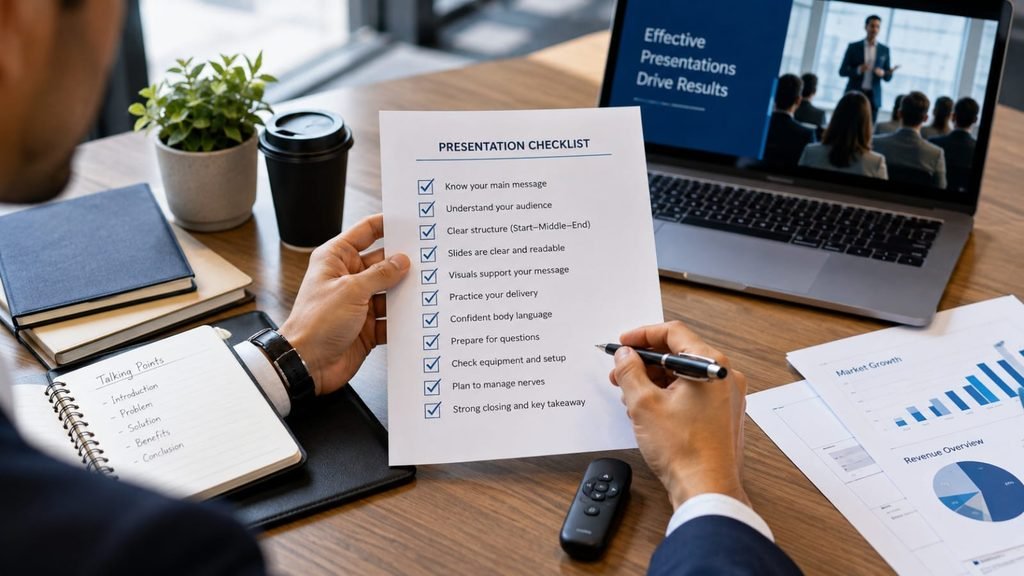
Before your next presentation, run through this checklist:
☐ I know the main point I want the audience to remember.
☐ I understand who my audience is.
☐ My presentation has a clear beginning, middle, and ending.
☐ My slides are easy to read.
☐ My visuals support the information.
☐ I have practiced speaking aloud.
☐ I know my key points without memorizing every sentence.
☐ I have prepared for likely questions.
☐ I have checked my equipment.
☐ I have a plan for managing nervousness.
☐ I know what I want the audience to take away.
Frequently Asked Questions
How can I keep an audience engaged during a long presentation?
Break the presentation into smaller sections and give your audience a reason to stay involved. Use a question, short example, change in pace, or quick interaction when the topic allows it. You do not need to entertain people every minute; you need to give them clear reasons to keep paying attention.
How do I know if my presentation is too long?
Practice the presentation while timing yourself, then check whether every section supports your main message. If you notice repeated explanations or points that do not add much value, cut them. A shorter presentation with a clear message is usually more useful than one packed with unnecessary information.
Should I memorize my presentation or use notes?
You usually do not need to memorize every word. It is more practical to know your main points, transitions, opening, and conclusion. Short notes can remind you what comes next without making your delivery sound like you are reading a script.
How can I improve my presentation skills if I do not have an audience to practice with?
Record yourself presenting on your phone and watch the recording afterward. Pay attention to your pace, pauses, eye contact, gestures, and sections where you sound uncertain. You can also practice explaining your topic to one person and ask for specific feedback rather than simply asking whether the presentation was “good.”
What is the best way to start a presentation?
Start by giving the audience a reason to pay attention. You could introduce a problem, ask a thoughtful question, describe a familiar situation, or briefly explain why the topic matters to them. Then make the purpose of your presentation clear.
How can I tell whether my presentation slides are helping or hurting my delivery?
Look at what happens when you present without the slides. If you can explain your ideas clearly but depend on the screen to remember every sentence, the slides may contain too much information. Good slides should support your explanation, not replace it.

Conclusion
Good presentation skills do not come from sounding perfect. They come from knowing your message, understanding your audience, and practicing enough to feel comfortable with your delivery.
Start small. Decide what you want people to remember. Keep your slides focused, practice aloud, and pay attention to your pace, eye contact, posture, and pauses.
You will not improve by waiting until you feel completely confident. Present, notice what worked, fix one weak spot, and try again. Your next presentation should be a little better than the last one.